Project Description:
The Ledge Village is series of 3D buildings and accessories that can be combined in a mix and match fashion to build tiny villages on small ledges around your home. The buildings are thin, with all detail on the front so they fit on small trim ledges. Each file comes with a building and some accessories to build the village. Currently 3 different buildings are being uploaded with additional buildings to follow.Below you can see an arrangement including the two-story house, cottage and Greek Revival house cutting files. The first display is on a unique ledge in my laundry room which inspired me to create the line of drying clothes. You can see many additional photos of this space here.


The village continues to grow with new buildings coming.

Here is another view of the original group arranged on top of the door trim in my sunroom.

Consider installing a grouping on a window ledge. The outside light shines through and makes the windows "light up".

Here are some construction directions:
Note:
I am a new Silhouette Contributing Artist. Both my Silhouette files and this website are the beginning. Send along any suggestions, problems, ideas or photos as we learn to create together. I'd love to hear from you! Marji RoyeMail: ashbeedesignemail@gmail.com
Tutorial assembled using Silhouette Software Release 2.7.18. This tutorial assumes you already know how to use the Silhouette and Silhouette software.
Other files in the series include:
Supplies Needed:
- Template from Silhouette On-Line Store (links below)
- 3D Cottage here (includes maple tree, laundry and picket fence)
- 3D Two-Story House here (includes evergreen tree and picket fence)
- 3D Greek Revival House here (includes evergreen tree and picket fence)
- Glue dots 3/16"
- Silhouette Cameo
- Card Stock
Steps for completing the 3-D House Construction:
These steps apply to any of the houses. Although visually different, the construction technique is the same.1. Download the cutting file for your Silhouette Cutting machine from the Silhouette Online Store by following the links above.
2. Prepare the files:
- The downloaded Silhouette file for the Two Story house looks like this. The other buildings are similar with the main building, the roof piece and some various landscaping accessories. The tree will need to be copied and pasted and duplicated in a new file because you need to cut it three times.
- The picket fence is optional. If you don't need it, then remove it from the file because it does take a while for it to cut.
- The tree can be re-sized to suit your display.

3. Cut the files.
- The settings will depend on the paper you use. I have been using white index card stock and cutting at a speed of 3, a depth of 33 and the blade set to 4.
- Carefully remove the cut files from the backing mat.
4. Fold the house.
- Note each cut file has dotted lines. These are fold lines.
- Fold all the dotted lines inward.

5. Glue all seams




- I like to use Glue Dots on the edges although other glue types are appropriate.
- It is important to make square corners. I start at the bottom and get that even and then move up to the roof line.
- I insert a skinny tool through the door to help press all seams together.
- The roof gets glued on last. It is flush with the back and has an over-hang in front.
Steps for completing the 3-D Tree Construction:
6. Cut the tree pattern three times in card stock.
- Note on tree in cottage cutting file: I just received an email from a crafter letting me know that I omitted the fold line on the maple tree in 3D Ledge Village Cottage cutting file. You can quickly add that following these steps.
- Copy the tree and paste in a new document. I cut from 8.5 x 12 cardstock so I rotated the tree.
- Select the line tool from the tool menu on the left.
- Draw a line through the middle of the tree trunk and right up through the leaves.
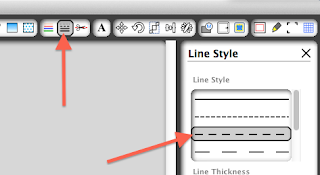
- Change the line to dashes by selecting the Line Style button and then the dash choice noted with the red arrow below.

- Duplicate that tree - You'll need two with dashes and one without.
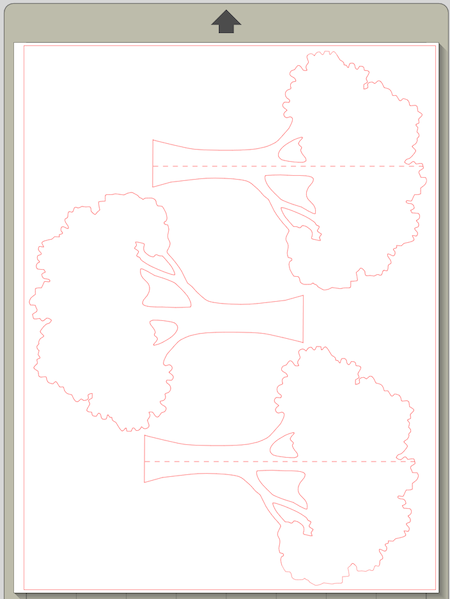
- Here is what the completed file looks like:
- Cut the tree file.
- Remove from the cutting mat.
- Fold on the center dotted line.
- The three trees are glued together to form a tree that is 3-D to the front. Below is a diagram showing how it will look from the bottom. Tree 1 (black) is flat. Tree 2 (red is folded and glued on the left half of Tree 1. Tree 3 (blue) is folded in half and glued to the right half of Tree 1.

7. Place on the wall.
- I use Blu Tak or a similar product to attach to the walls with a material that doesn't damage the wall and is easy to re-position.


Variation:
I recently received an email from Nicole Scherrer in Switzerland. She has been making the Ledge Village but also combined it with the "Birds on a Wire" theme and crafted this variation:

Here is link to her blog and more photos of her Ledge Village.I recently received an email from Nicole Scherrer in Switzerland. She has been making the Ledge Village but also combined it with the "Birds on a Wire" theme and crafted this variation:
**********
© 2013 Marji Roy, Ashbee Design
.jpg)


.jpg)


